Drawing and editing tiles
Many of JETCARP’s tilings can be reshaped, and new ones can be drawn from scratch. There are three tools: the tile editor, which bends the edges and moves the corners of a tile from one of the editable tile families or the isohedral types; the isohedral picker, which chooses one of Kaplan’s 81 isohedral types and sets its shape with sliders; and the unit cell editor, which draws any repeating arrangement of polygons. Whatever you make is saved in the scene, so a reshaped world replays exactly. (To paint cells rather than tiles, use the Draw pane.)
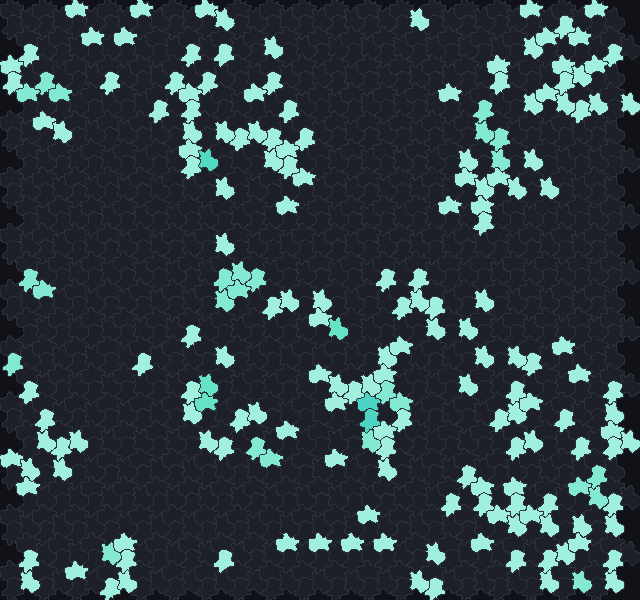
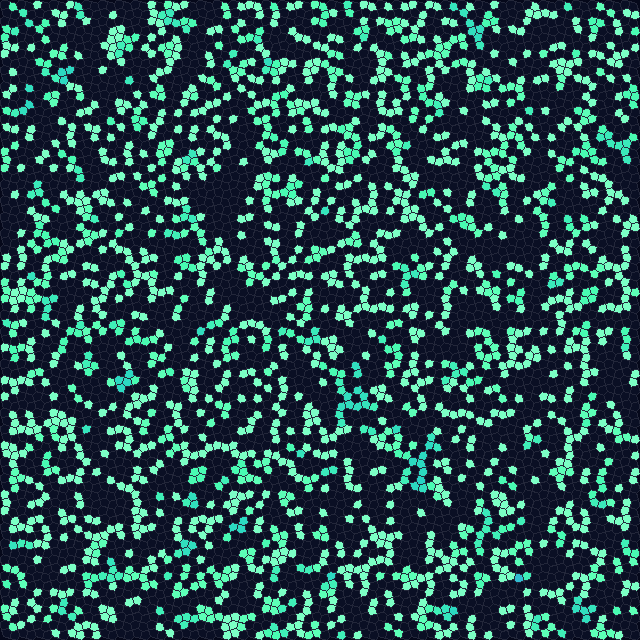
B2/S34. Scene docs/scenes/tilings/editable-lizard.json. Right: isohedral
type IH28 with Tactile's default shape. Scene docs/scenes/tilings/isohedral-ih28.json.What can be edited
| Tilings | Tile editor | Unit cell editor |
|---|---|---|
Editable families: lizard, hex, brick, square, quad, triangle, glide, fourfold, cairo | Corners and edges | Can start from one, with straight edges |
Isohedral types ih01 to ih93 (81 types) | Shape sliders and edges | Can start from one |
| Fixed tilings: the Archimedean tilings, the k-uniform catalogue, herringbone, Pythagorean squares, flat-topped hexagons | Fixed shapes | Can start from one and change it |
| Aperiodic: Penrose, hat, spectre | Fixed shapes | Not available |
For the editable families and the isohedral types, reshaping changes how a world looks, not how a rule behaves: the automata use the neighbour graph of the family, and dragging corners or bending edges does not change which tiles meet. When curved edges would make different tiles touch, the tile editor says for how many tiles, and that CAs use the straight-edge graph. In the unit cell editor, on the other hand, which tiles are neighbours is measured from the polygons you draw, so a new cell is a new graph.
The tile editor
Open it with Tiling → Tile editor…, or Edit tile… in the Tiling pane. The window shows the tile in the middle of a canvas, with ghost copies of its neighbours around it, and the controls on the right.
- Choose the family in the list at the top (the current tiling’s is chosen already). Below it are a note on the family and its symmetry group. For an isohedral type the type picker and its sliders appear here too (see below).
- Pick an edge. Edges come in colour-coded classes, and each edge’s partner follows it, so the tiles always fit. Click an edge to select its class (Edge class 2 of 3).
- Choose its shape: Free (any shape, which its partner copies), Mirror (symmetric about its midpoint), Half-turn (the same after a half turn) or Straight. Some choices are greyed out where the way an edge pairs with its partner allows only certain shapes, and the editor says so (This edge must stay half-turn symmetric to fit its neighbour).
- Bend it. Add point, or double-click an edge, adds a point; drag points and corners with the mouse; Delete point removes the selected one. Lines joins the points with straight segments, Curves with smooth curves.
- Use it. Use this tile rebuilds the world on the new tile. With Live ticked, the world is rebuilt after every edit.
Snap (Off, Square, Triangle) keeps points on a grid. Undo steps back, Randomize gives random edge shapes within the family’s rules, and Reset returns to the family’s default tile. A line under the controls says Valid tile, or Edges cross: tiles would overlap when an edge has been bent through another.
Copy tile JSON puts the tile on the clipboard as text, and Load JSON below reads one pasted into the box underneath, which is a way to keep and share tiles. (The Tiling pane’s Paste tile JSON from the prototype section reads tiles copied from JETCARP’s original JavaScript tiling editor.)
Isohedral types
In the Tiling pane’s family list, choose Isohedral IH01–IH93 (81 types). The type picker appears
under it: < and > step through the types, and the list shows each one’s symmetry group, number of
corners and number of parameters (for example IH28 p4 5 corners, 2 params). Each parameter has a
slider (p1 to p6; the world is rebuilt when you let go), and Default shape returns to Tactile’s
own. Types with no parameters say No shape parameters: the corners are fixed. Edges can still be
reshaped. To reshape the edges, open the tile editor, which shows the same picker; its edge choices
follow Tactile’s rules for the type, so the tile stays in it.
From the command line, jetcarp isohedral lists the 81 types with their symmetry groups and neighbour
counts, and jetcarp isohedral --png sheet.png draws all of them on one contact sheet (with random
edge shapes, or straight ones with --straight; --seed picks other random shapes). In a scene or a
script, a type and its parameters look like this:
"tiling": {"family": "ih28", "params": {"p": [0.45, 0.5]}, "size": {"cells": 2000}}
let w = world(#{ tiling: "ih28", params: #{ p: [0.45, 0.5] }, size: 2000 });
The unit cell editor
The unit cell editor draws tilings of the periodic family: two lattice vectors, which say how the
cell repeats, and any polygons inside one cell. Tiles may have different shapes and need not meet
edge to edge. Open it with Tiling → Unit cell editor…, or Edit unit cell… in the Tiling pane
(it is not available for the aperiodic tilings, which have no unit cell).
- Start from an empty square or hexagonal lattice, any fixed tiling, any tiling of the catalogue, or an editable family with straight edges.
- Tools. Select drags corners, whole tiles and the two lattice arrows; double-click an edge to add a corner. Draw tile adds a tile corner by corner: click the corners, then click the first one again, double-click or press Enter to close it; right-click removes the last corner and Esc cancels. Stamp n-gon puts a regular polygon with a chosen number of Sides on the edge you click (or in empty space), with options for its side length and which side of the edge it goes.
- Snapping. Snap to Corners, Edges and Angles, a Grid (Off, Square, Triangle), and Move shared corners together, so that dragging a corner drags every corner sitting on it. Ghost rings sets how many rings of neighbouring cells (1 to 3) are drawn around the cell.
- The selected tile can be deleted, duplicated or moved back into the cell, and its corners inserted or deleted. Undo, Redo and Fit view work as usual; scroll to zoom and drag empty space (or use the right button) to pan.
As you work, the editor checks the cell for overlaps between tiles and their copies, gaps, tiles that cross themselves and edges with nothing on the other side. It lists every tile with its number of corners, area and measured neighbours (by edge and touching), and says Valid tiling when all is well. Use this cell (available once there are no errors) rebuilds the world on it, and Live does so after every valid edit. Copy cell JSON and Load JSON below copy and paste the cell as text.
A cell in a scene or a script is written as the lattice vectors a1 and a2 and a list of polygons,
each a list of corners. This one cuts the unit square into two triangles:
"tiling": {"family": "periodic",
           "params": {"a1": [1, 0], "a2": [0, 1],
                      "polys": [[[0, 0], [1, 0], [1, 1]], [[0, 0], [1, 1], [0, 1]]]},
           "size": {"rect": {"w": 40, "h": 30}}, "boundary": "wrap"}
let cell = #{ a1: [1, 0], a2: [0, 1],
             polys: [[[0, 0], [1, 0], [1, 1]], [[0, 0], [1, 1], [0, 1]]] };
let w = world(#{ tiling: "periodic", params: cell, size: [40, 30], boundary: "wrap" });
In the scene
A reshaped or drawn tile is part of the scene’s tiling: its shape parameters in params and, for
tiles made in the tile editor, the shape of each edge in edges (see
Scene file format). Changing the tile starts the
world’s command log again from the new tiling, as any change of tiling does. Saved, the scene replays
to the same hash. JETCARP’s tests pin the geometry of every family’s default shape and
every catalogued tiling; a tile of your own is checked by its scene’s hash instead (see
Reproducibility).
More: Editable tile families, Isohedral tilings, Tilings as neighbour graphs and the tiling catalogue.