Tilings as neighbour graphs
A tiling covers the plane with tiles, leaving no gaps and no overlaps. For a cellular automaton, what matters about a tiling is not the shapes of its tiles but who is next to whom: its neighbour graph. JETCARP builds that graph for every tiling it supports, and every rule runs on the graph. This page explains how the graph is made and why two very different-looking tilings can be the same thing as far as an automaton is concerned.

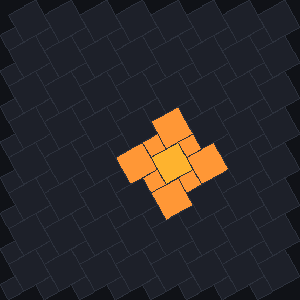
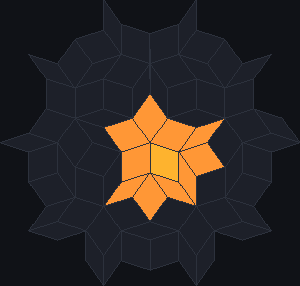
docs/scenes/tilings/graph-brick.json, graph-pyth.json and
graph-rhomb.json, 1 generation of a rule that switches on every cell with exactly one live
neighbour.What it is
The neighbour graph has one node for each tile and a link between every two tiles that are neighbours. There are two kinds of neighbour (see How JETCARP generalises automata):
- Touch neighbours share any part of their boundary: an edge or just a corner.
- Edge neighbours share a stretch of edge, not just a point.
A tile’s number of neighbours is its degree. In a tiling with one kind of tile placed the same way everywhere, every tile has the same degree; in mixed tilings the degree depends on the tile; in aperiodic tilings it varies irregularly across the plane. The tiling catalogue lists the degrees of every tiling.
Many tilings that look different have the same graph. A brick wall in running bond has the same neighbour graph as the hexagon tiling, and so does a herringbone pattern: each tile meets six others in the same arrangement. Escher’s lizards, on the three-fold hexagon tile, are hexagons as far as a rule is concerned. Any rule that only counts neighbours behaves identically on tilings whose graphs are the same, so a pattern found on one is a pattern on the other. This matters for honest claims. Every isohedral tiling has the graph of one of the eleven Laves tilings, so JETCARP’s 81 isohedral types are only eleven worlds for a rule: 30 of them are the square grid, 19 the hexagonal grid, 8 the triangular grid and 3 the Cairo tiling (see Isohedral tilings). Spaceships first found on isohedral tilings were Conway’s glider and its relatives in a different drawing. Likewise the quadrilateral, glide and four-fold families are squares and the Pythagorean tiling is 4.8.8. JETCARP compared all 362 combinations of its tiling families, isohedral types and 2- and 3-uniform tilings with both neighbourhoods and found 196 distinct graphs (Findings).
Rules that turn, such as Langton’s ant, also need the order of a tile’s neighbours around it, so JETCARP keeps each tile’s neighbours in clockwise order. And one family, Lenia, uses actual distances between tile centres, so for it the geometry matters too.
Where it came from
The standard reference on tilings is Branko Grünbaum and G. C. Shephard’s Tilings and Patterns, which defines the terms used here, such as edge-to-edge tilings and the symmetry groups of periodic tilings (Grünbaum and Shephard 1987; 2nd edition 2016). Treating the cells of an automaton as the nodes of a graph is a standard idea; the earliest automata already defined their neighbourhoods as fixed sets of nearby cells, named after John von Neumann and Edward F. Moore (Moore 1962). General tools that run rules on arbitrary polygon meshes, such as Ready, work the same way (Ready).
How JETCARP runs it
Building the graph
JETCARP stores a tiling in one of three ways, depending on its kind:
| Storage | Used for | How neighbours are found |
|---|---|---|
| Dense | lattices of one tile (squares, hexagons, bricks, any quadrilateral) | a fixed stencil of offsets |
| Periodic | a unit cell of several tiles repeated (Archimedean, k-uniform, isohedral, Cairo, herringbone, Pythagorean, drawn tiles) | a table of offsets for each tile in the cell |
| Explicit | finite patches of aperiodic tilings (Penrose, hat, spectre) | each tile’s neighbour list, written out |
For tilings that are not edge to edge, such as herringbone, the Pythagorean tiling and tiles you draw yourself, JETCARP measures contact from the geometry: two tiles are edge neighbours if they share a stretch of boundary and touch neighbours if they share any point. The tests check tilings for overlaps and gaps.
Size and edges
A periodic world is a rectangle of whole unit cells, given either as a number of cells (roughly square) or as a width and height in unit cells. Its edges can be dead (cells beyond count as empty), wrapped (a torus, so the tiling has no edges at all) or live (cells beyond count as alive). An aperiodic world is a patch of a chosen level, from 10 tiles at level 1 to about 35,000 at level 5 and about 18 million at level 8, always the tiles nearest a fixed centre, so smaller patches sit inside larger ones. Aperiodic patches have dead edges.
Different tilings, same rule
Because rules only see the graph, any scene can switch tiling and keep its rules (apart from the few
families tied to one grid; see How JETCARP generalises automata).
jetcarp tilings and jetcarp isohedral print the degrees JETCARP measures.
What is new here
Nothing on this page is new as an idea. What JETCARP adds is breadth: the same graph model for the regular, Archimedean, k-uniform, isohedral, drawn and aperiodic tilings, so that every rule runs on all of them. JETCARP’s exploratory search also treats the tiling itself as one of the dimensions it explores; see What is new in JETCARP.
Try it
jetcarp tilingslists every tiling family with its edge and touch degrees.- Run the same rule on the brick tiling and on hexagons: it behaves the same way on both, because the graphs are the same.
jetcarp run docs/scenes/tilings/graph-rhomb.json --gens 1 --png rhomb.png