Palettes and colouring
Every automaton draws in a palette: a list of colour stops, plus a background colour for empty cells and a stage colour for the area outside the tiling. Its colour by setting decides how its states, and how long each cell has been in its state, are spread along the stops. This guide shows how to pick a palette, make your own, and choose the colouring, including age colouring. The 30 built-in palettes, with their colours, and the exact rules for every family are in the Palettes reference.
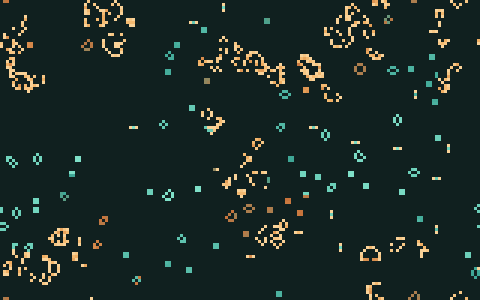
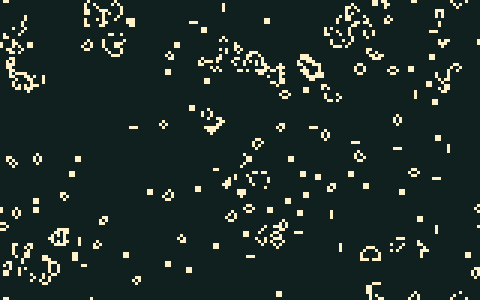
docs/scenes/guides/palettes-age.json and palettes-state.json.Pick a palette in the app
- One automaton. In the CAs pane, each automaton’s card has a Palette list with the built-in palettes and any the scene has of its own. A JACA automaton has two, +1 palette and −1 palette, each with a colour button beside it that sets a single colour instead.
- The Palettes window (CA → Palettes…) shows every palette as a swatch on its own background, so the light ones (Candy, Glacier, Desert and Paper) look right. Choose what to colour under Apply to, every automaton or one, then click a swatch to apply it. Hovering over a swatch, or moving between swatches with the arrow keys after a click, previews it on the grid; Enter applies it.
On a field that several automata share, only the first automaton’s palette shows, and the grid’s background and stage colours always come from the first automaton’s palette (see Several automata at once). If a palette change seems to do nothing, change the first automaton’s instead.
Make your own palette
The lower half of the Palettes window edits a palette:
- Start from a palette that is close to what you want, and give it a Name.
- Change the Stops: click a colour to change it, x under it to remove it, and + to add one. The first stop colours the youngest cells or lowest states, and the last the oldest or highest. The bar above the stops shows the ramp as JETCARP will draw it.
- Set the Background (empty cells) and the Stage (outside the tiling, and the letterbox around a wallpaper that does not fill its image).
- Save as “name” adds it to the scene’s own palettes; an edited built-in palette is saved as “name copy”. Apply to every CA (or to the CA) saves it and applies it at once.
A palette you make belongs to the scene: it is saved in the scene file and travels with it, so whoever
opens the scene sees your colours. To use it in another scene, copy its entry from the first scene’s
palettes list (see Scene file format), or apply it again in the app.
You can also write colours directly wherever a palette is named in a scene or a script: #4fc3ff is
one colour, and #103050-#4fc3ff a ramp from the first to the last, with any number of stops between.
The same works for the --palette options of jetcarp wallpaper, jetcarp sheet,
jetcarp hashlife, jetcarp pile and jetcarp media render.
Choose how cells are coloured
Every automaton has a Colour by setting, in the CAs pane, as color_by in a scene, and as the
color_by option of add_ca and update_ca in a script:
| Setting | What it shows |
|---|---|
Auto (auto, the default) | The rule’s natural colouring: age for Life-like, Generations and similar rules; every state for the cyclic and Hodgepodge rules; heights for sandpiles; values for Lenia; fixed colours for WireWorld, the forest fire and von Neumann’s automaton |
Age (age) | How long each cell has been in its state (see below) |
State (state) | One colour per state, spread evenly from the first stop to the last |
Row (row) | Each live cell by its height in the picture, top to bottom across the whole palette: a gradient for elementary rules, or any tiling |
The full table of what Auto means for each family is in the reference.
Age colouring
Each live cell carries an age: the number of generations it has been in its current state, starting at 1 when it is born or changes state. Coloured by age, a newborn cell takes the palette’s first stop, and older cells move along the palette on a logarithmic scale, reaching the last stop at an age of 400. So a still life ends at the last stop, an oscillator flickers near the start, and the debris of a soup shows its own history: the places still active at the young end, the parts that settled long ago at the old end. The figure at the top of this page shows it.
A few things to know:
- Choosing a palette for it. Some palettes end on a bright stop, such as Verdigris, so that settled patterns stay vivid; others, such as Ember, end on a dark stop close to their background, so that settled patterns fade and the active regions stand out instead.
- HashLife resets ages. After a HashLife jump every live cell has age 1, so the colours start over (see HashLife and very long runs).
- Ages are part of the state. They are included in the state hash, so two runs that look the same in state colouring but differ in age have different hashes.
- Media use states. The animations that
jetcarp mediamakes colour cells by state, never by age, so that their loops close seamlessly (see Pictures and animations).
JETCARP makes no claim for age colouring: other programs, such as Chris Rowett’s LifeViewer, colour cells by age and did so first (see What is new in JETCARP).
On the command line and in scripts
jetcarp paletteslists the built-in palettes with their background colours, andjetcarp palettes --jsongives their stops, backgrounds and stages as data.- Commands that draw pictures take
--palette NAMEto colour every automaton with one palette:jetcarp wallpaper,jetcarp sheet,jetcarp hashlife,jetcarp pile(sandpile heights, with--reverseto run the palette the other way),jetcarp library renderandjetcarp media render(in place of the media’s own house style). - In a script,
w.add_ca(rule, #{ palette: "Tide", color_by: "age" })sets an automaton’s palette and colouring,w.update_ca(id, #{ palette: "Ink" })changes it, andw.save_png(path, #{ palette: "Paper" })draws one picture in another palette without changing the world.jetcarp("reference.palettes")returns the built-in palettes as data. - In a scene, each automaton’s
palette(and, for JACA,palette_neg) andcolor_byfields, and the scene’s ownpaletteslist (see Scene file format). - Screensaver profiles and rotations can replace every automaton’s palette and colouring with their own, without changing the scene.