Several automata at once
A world can run any number of automata on one tiling, each with its own rule, seed, palette and settings. Every generation they step in turn. Whether they act on each other depends on their fields, the arrays of cell values they work on: automata of the same kind share one field by default, so each reads and writes the others’ cells; an automaton with Affects others switched off keeps a private field instead, drawn alongside the rest but untouched by them. This guide explains which automata share, how to change it, in what order they step, and how several fields are drawn.
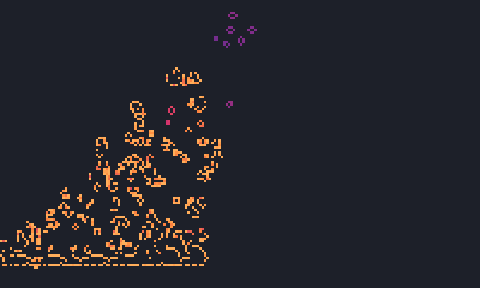
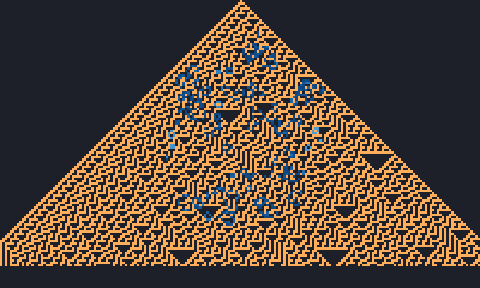
docs/scenes/guides/several-shared.json.
Right: with Affects others off for Life, it runs from a soup of its own on a private field,
drawn in blue over Rule 30's untouched triangle. Scene
docs/scenes/guides/several-separate.json.Which automata share a field
Every rule needs a certain kind of field:
| Field | Rules |
|---|---|
| Binary (live or dead, with ages) | Life-like rules, two-state Larger than Life, elementary rules, two-state hexagonal row and layered rules, Margolus rules, and ants and turmites with two colours |
| Multi-state (a state number, with a given number of states) | Generations, cyclic, Greenberg–Hastings, rock-paper-scissors, Hodgepodge, forest fire, WireWorld, JACA, the Spectre glider and other priority tables, rule tables, von Neumann’s automaton, and turmites with more than two colours |
| Height | The sandpile |
| Continuous (a value between 0 and 1) | Lenia |
- Binary rules share by default. Affects others starts on, and every binary automaton with it on works on the same field.
- Other rules start on a private field. Affects others starts off. Switch it on and the automaton
shares a field with the others of exactly its kind: the same field kind and the same number of
states. Two
B2/S/C3automata can share; aC3and aC4cannot. - Sandpiles never share. Their field holds grain heights, which no other rule understands, so the checkbox is greyed out.
When an automaton joins a shared field, its live cells are copied into it. When it leaves, it takes a private copy of the shared field as it is at that moment, and from then on the two evolve separately. A B/S rule added to a shared field that already has live cells, with no seed of its own, starts from those cells rather than scattering a random soup over another automaton’s work.
Order within a generation
The automata step in list order: the order they were added, or in a scene the order of its cas
list. Each takes its steps per generation (1 to 100,000) before the next begins, so on a shared
field a later automaton sees what an earlier one did in the same generation. Ants are usually given
many steps per generation (100 or 200 in the built-in scenes) so that they keep up with the cellular
automata around them. An automaton whose checkbox is cleared does not step at all, but its field
stays and is still drawn.
To have automata take turns over longer stretches, a scene can carry a sequence: a list of steps, each naming the automata that run during it and a trigger that moves on to the next (after a number of generations, when the population passes a value, when activity drops, when the world repeats, and so on). The Sequence pane builds one with New sequence, and Apply and start runs it; it is saved with the scene. The built-in Script: Rule 30, Day & Night, Seeds, Life, ants is a five-step example, and the format is in Scene file format.
In the app
- Add automata with CA → Add from catalog (the named rules, by family), CA → Add by notation…
(which opens the Add pane: pick a named rule and press Add, or type any rule in
notation such as
B36/S23orAnt RLR), or CA → Load rule table…. - The CAs pane has one card per automaton. Its header has the checkbox that runs it, its name and notation, and Remove. Inside are the rule, the neighbourhood (Touching or Edge), the Affects others checkbox with the field it is on (for example field 0 · shared binary · 3 CAs), Steps per generation, Colour by, Palette, and the Seed, Random and Clear buttons. Ant cards add + Ant and what ants do at a dead edge (Edge: bounce or Edge: fall off).
- Seed and clear every automaton at once from the Seed menu (Seed every CA, Random cells in every CA, Clear every CA), or one at a time from Seed → Each CA.
- Draw into one field. The Draw pane’s Into list chooses which automaton’s field the mouse paints.
From the command line, scripts and scenes
In a scene, affects_others is a field of each automaton:
"cas": [
  {"rule": "W30", "seed": "top_center"},
  {"rule": "B3/S23", "affects_others": false, "seed": {"blob": {"radius": 0.45, "density": 0.35}}}
]
In a script, it is an option of add_ca and update_ca:
let w = world(#{ tiling: "square", size: [200, 120], boundary: "dead" });
let r30 = w.add_ca("W30", #{ seed: "top_center" });
let life = w.add_ca("B3/S23", #{ affects_others: false, seed: "blob:0.45:0.35" });
w.step(110);
w.update_ca(life, #{ affects_others: true });   // join Rule 30's field from here on
jetcarp run reports every field and who is on it:
field 0:    shared binary, 6287 live: Rule 30 [W30]
field 1:    private binary, 584 live: Life [B3/S23]
How several fields are drawn
Each field is coloured by the first automaton in the list that uses it, with that automaton’s palette and Colour by setting. Changing the palette of a later automaton on a shared field therefore changes nothing you can see; change the first one’s. Fields are drawn in list order, later ones over earlier ones, with ants on top. Empty cells take the background of the first automaton’s palette, and the area outside the tiling its stage colour. The details are in Palettes.
Examples to try
- Rule 30 meets Life and ants (Quick Start): Rule 30 writes rows, Life rewrites what it leaves behind, and three ants taking 100 steps per generation wander through both, all on one binary field.
- Script: Rule 30, Day & Night, Seeds, Life, ants (Quick Start): five rules on one shared field, switched on one after another by a sequence.
- The two scenes of the figure above: run them with
jetcarp run docs/scenes/guides/several-separate.json --gens 110 --png out.png, then switch Affects others on and off in the app and watch the triangle.
More: Core ideas and How JETCARP generalises automata to any tiling.