Core ideas: tilings, cell fields, rules, scenes
JETCARP has a handful of ideas that the rest of this book takes for granted. This page introduces them briefly, in the order they build on each other, and points to the pages that explain each one properly.
A tiling is a neighbour graph
A tiling covers the plane with tiles, with no gaps and no overlaps: squares, hexagons, mixtures of polygons, shapes you draw yourself, or the aperiodic Penrose, hat and spectre tilings, which never repeat. Each tile is a cell of the automaton.
What a rule needs to know about a tiling is only who is next to whom. JETCARP turns every tiling into a neighbour graph: one node per tile, linked to its neighbours, kept in clockwise order around each tile. There are two kinds of neighbour. Touch neighbours share an edge or just a corner; on squares these are the eight cells of the Moore neighbourhood that Conway’s Life uses. Edge neighbours share a stretch of edge; on squares, the four cells of the von Neumann neighbourhood.
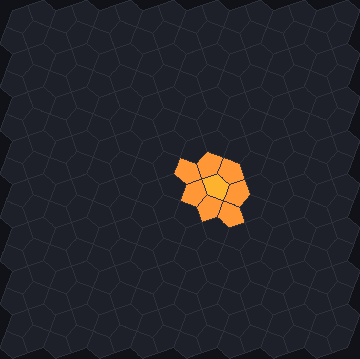
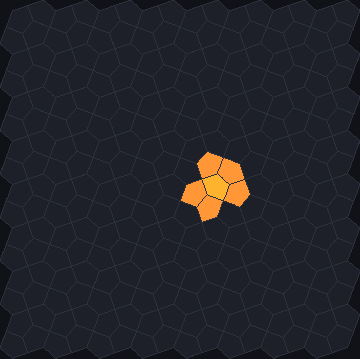
docs/scenes/automata/generalising-touch.json and
generalising-edge.json, 1 generation.On squares every cell has 8 touch neighbours. Elsewhere the numbers change, sometimes from tile to tile: a triangle touches 12 others, an octagon of the 4.8.8 tiling 8 and its squares 4, and a Penrose rhomb between 7 and 11. Most rules count neighbours, so the same rule behaves quite differently on different tilings, and that is much of what makes JETCARP interesting. Two tilings that look different can have the same graph, and then every counting rule behaves the same on both.
More: Tilings as neighbour graphs, How JETCARP generalises automata to any tiling, and the tiling catalogue.
Cells live in fields
The states of the cells are kept in a cell field: one value per tile. What a value means depends on the rule. A binary field holds live or dead cells, each with an age, the number of generations it has been in its state. A multi-state field holds a state number (Generations, WireWorld, turmite colours, JACA’s +1 and −1). A height field holds sandpile grains, and a continuous field holds a value between 0 and 1 (Lenia). Time moves in generations: every cell’s next state is computed from the current states of itself and its neighbours, all at once.
Rules and families
A rule says how a cell’s next state follows from its own state and its neighbours’. Rules come in
families, each with its own notation: Life-like rules written as
birth and survival counts (B3/S23 is Life), Generations rules with dying states (B2/S/C3), Larger
than Life with a larger range, Langton’s ant and the turmites, which are agents that walk and turn
(Ant RL), the cyclic and excitable rules, sandpiles, Lenia, priority tables, rule tables, and others.
Two families are, to our knowledge, new in JETCARP, both Jimmie Rodgers’s:
JACA, an annihilating two-sided Life, and layered rules,
which grow Wolfram-style row rules outward from a seed on any tiling (see
What is new in JETCARP). Many rules also have names, such as Life, HighLife or
Brian’s Brain.
Every family is written in terms of the neighbour graph, so almost every rule runs on almost every tiling. The few that are tied to a particular grid, such as the elementary row rules and von Neumann’s 29-state automaton, say so.
More: the encyclopedia of cellular automata, one page per family, and the named rule catalogue.
Several automata on one tiling
A world is one tiling with one or more automata on it, each with its own rule, seed and palette. Every generation the automata step in order. Automata of the same kind (all binary, say) share one field by default, so they act on each other’s cells: in the built-in scene Rule 30 meets Life and ants, Rule 30 writes rows, Life rewrites what it leaves behind, and three ants wander through both. An automaton with Affects others switched off keeps a private field instead, drawn alongside the others but untouched by them. Automata whose fields cannot be shared, such as a sandpile, always keep their own. A scene can also carry a script, which switches automata on and off in turn as conditions are met.
More: Several automata at once.
Scenes are how runs are kept
A scene is a small JSON file that holds everything needed to reproduce a run: the tiling, the
automata with their rules and seeds, the state of the random-number generator, and the log of every
change made since. Opening a scene replays it, so it comes back exactly as it was. A saved scene
records the generation and state hash it reached, and jetcarp verify checks that it still gets
there: the same scene gives the same state, bit for bit, on any number of threads, on the CPU or the
GPU, and, by design, on any operating system. Scenes are what you save and share, what the command line runs, and
what every picture in this book is made from.
More: Scenes: saving, sharing, reproducing, the scene file format and Reproducibility.
Quick Start
Quick Start is the menu of ready-made scenes that the app opens with, each shown as a live preview. Its entries come from four sources, all kept in the pattern library: the classics built into JETCARP (hand-made scenes and a working example of every named rule, each on the grid it is usually shown on), entries from the packs you import, the atlas of runs picked from an exploratory search, and My finds, the entries you add yourself from patterns, runs and scenes. It is the quickest way to see what JETCARP can do, and an entry, once open, is a scene like any other: move it to another tiling, change its rule, save it. Right-click a card to rate it or hide it.
More: A tour of the app and Building your own Quick Start.
The pattern library
The pattern library, or catalogue, is a database of verified patterns: still lifes, oscillators, spaceships and the like, each with the tiling it lives on and the range of rules it works in, plus the runs of ants and turmites and the record of every search. Nothing goes in unverified: each pattern is run again on its own and checked cell by cell before it is stored. Patterns can be pasted into a world, rendered as pictures and animations, and promoted to Quick Start.
More: The pattern library.
Jobs
Searches can run for minutes or for weeks, so each one runs as a job: a record in the catalogue with
the search’s settings, its progress and a checkpoint. A job can be stopped, closed with the program
and carried on later, on this machine, and it ends exactly as an uninterrupted run would. The command
line starts searches with jetcarp search <strategy> (soup hunts, ant searches, rule censuses, the
evolutionary glider search and others) and manages them with jetcarp jobs.
More: Searching for patterns and Search methods.