HashLife and very long runs
HashLife, Bill Gosper’s algorithm of 1984, jumps a pattern millions or trillions of generations
ahead in a moment. It cuts the plane into blocks, remembers how each block evolves, and treats equal
blocks anywhere in space and time as one, so a pattern that is regular, such as a glider gun and its
stream, costs almost nothing to run far ahead. JETCARP’s HashLife was written for it from the
published algorithm, and it works on every periodic tiling, not just the square grid. This guide
covers what HashLife can run, the two ways of jumping, the HashLife view window, the
jetcarp hashlife command, scripts, and what to do for long runs HashLife cannot help with.
crates/jetcarp-core/data/scenes/life-not.json) after 210 generations, in the
Synthwave palette. Drawn by the app's offscreen test (see docs/tools/render-figures.sh).What HashLife can run
- Tilings: any periodic tiling. Each unit cell of the tiling is one site of HashLife’s lattice, holding the states of all its tiles, so the square grid (with either neighbourhood), hexagons, the Archimedean and k-uniform tilings, the isohedral types and the editable families all work. The aperiodic Penrose, hat and spectre tilings have no lattice, so they do not.
- Rules: those whose next state depends only on a cell’s own state and how many neighbours are in state 1: Life-like rules and Generations rules (rules with B0 included), WireWorld and Greenberg–Hastings. A world may have several such automata, on shared or separate fields. Any other rule is refused by name.
- Ages are not kept. After a jump every live cell has age 1, so age colouring starts over, and the
world’s state hash differs from that of a world stepped the same distance even though every cell
matches. Compare the hash of the cell states alone:
w.states_hash()in a script,cells_hashin the world status, or--compareon the command line. - Limits: jumps of up to 262 generations, and up to 65,536 different states per site (the number of states raised to the number of tile types in the unit cell). Memory is kept in check by a cap on the number of stored blocks (48 million by default, about 2 GB), beyond which unused blocks are cleared out; that never changes the result.
Two ways to jump
On the unbounded plane. The world’s live cells are taken out of their grid and run on an infinite plane, ignoring the grid’s edges, and the result is brought back as a new world: by default the same frame as the original, or any region of the plane. This works for any qualifying world on a periodic tiling.
In place, on a torus. A world with wrapped edges whose width and height, in unit cells, are both
powers of two (such as 256 × 128) is a torus that HashLife can advance exactly as stepping would. The
jump is logged as a jump command, so the scene replays it. A world with dead or live edges, or with a
sequence installed, cannot be jumped in place.
In the app
Run → Jump opens a small menu with a Generations box, which takes a number or a form such as
2^40 or 1e6, and three choices:
- Jump ahead (HashLife) jumps the world in place. When the world does not qualify, the button is greyed out and hovering over it says why (for example, HashLife needs a torus whose sides are powers of two (this one is 200 × 140 unit cells)).
- On the unbounded plane shows the same frame after that many generations on the plane, as a new world named after the old one (… +1000000 (HashLife plane)).
- HashLife view… opens the pattern on the plane in a window of its own, also under Tools → HashLife view…. Opening it pauses the world.
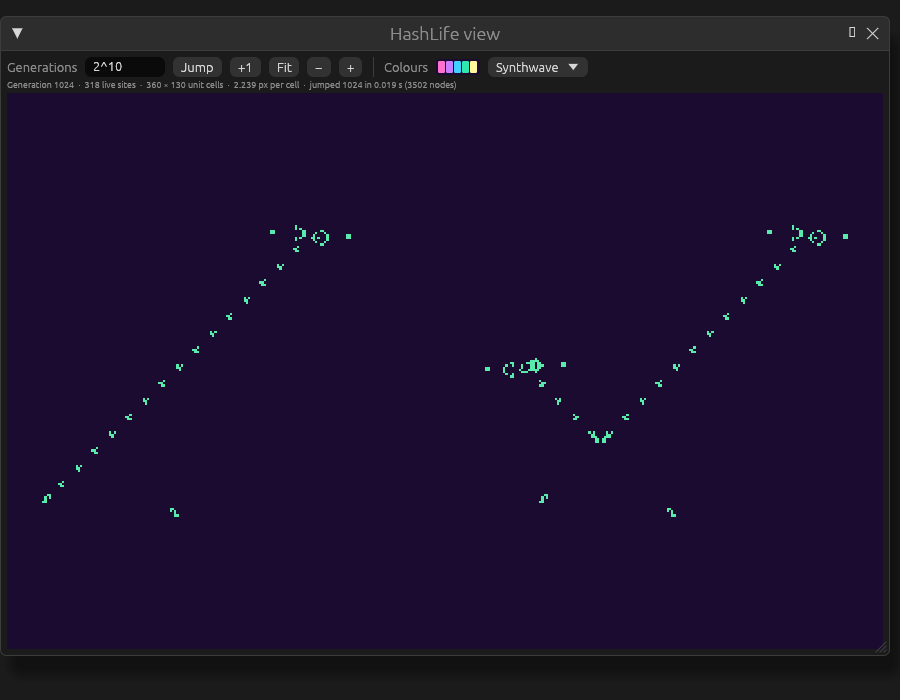
In the HashLife view, type a number of generations and press Jump, or +1 for one more. Drag to pan and scroll to zoom about the pointer; Fit frames the whole pattern, and − and + halve and double the zoom. Colours uses the world’s palette or any other. The line under the toolbar gives the generation, the number of live sites, the pattern’s extent in unit cells and the zoom. The view draws straight from HashLife’s blocks at the level where one block is about one screen pixel, so zoomed out it is as fast after 240 generations as after 100; zoomed in, every tile is drawn in its real shape. Jumps run in the background while the window shows the last frame.
On the command line
jetcarp hashlife takes a scene, a record exported from the pattern library, or a pattern in RLE or
plaintext. A Gosper glider gun, 240 generations on:
$ jetcarp hashlife gosper.rle --gens 2^40 --png gun.png
input:      gosper.rle
mode:       plane (square B3/S23)
generation: 1099511627776 (+1099511627776 in 0.008s)
population: 183251938004 (was 36)
bounds:     i 0..274877906961, j 0..274877906948 (274877906962 × 274877906949 unit cells)
nodes:      9277 live, 9277 peak, 0 collections
region:     i0 -8, j0 -8, 274877906978 × 274877906965
png:        gun.png (1025x1025, density map)
On the plane, the options choose what to export: --region i0,j0,w,h (in unit cells), or world
for the source scene’s own frame (the default is the pattern’s bounding box plus --margin, 8), and
--boundary for the exported world’s edges. --save FILE writes the region as a new scene, which
starts at generation 0 with every cell at age 1 (it has no recorded hash, so run it with jetcarp run
rather than jetcarp verify). --png FILE draws it with JETCARP’s renderer up to --max-cells cells
(16 million) and as a density map above that, in --palette, at most --max-side pixels. --rule
overrides the rule (RLE files default to their header’s rule, else B3/S23).
--torus jumps a scene in place instead, and --compare cpu (or gpu) also runs the ordinary
engine and checks that every cell agrees:
$ jetcarp hashlife torus.json --torus --gens 5000 --compare cpu
input:      torus.json
mode:       torus (Square (parallelogram) (square): 65536 cells, 256x256 unit cells, 1 tile type(s), storage dense, edges wrap)
generation: 5000 (+5000 in 0.200s)
population: 1969
states:     730e938cfe04df96
hash:       4cd23522a2a2780b
nodes:      71640 live, 71640 peak, 0 collections
compare:    cpu (32 threads) 3.539s, states equal
Saved with --save, a torus jump keeps the jump command in the scene’s log, so jetcarp verify
replays it. --node-cap changes the number of stored blocks before a clear-out, and --leaf-level
(at most 6) how large a block is stepped directly by a fast bit-parallel stepper for Life-like and
Generations rules without B0; neither changes the result.
In a script
let w = world(#{ tiling: "square", size: [256, 256], boundary: "wrap", rng_seed: 1 });
w.add_ca("B3/S23", #{ seed: "random:0.3" });
print(w.can_jump());           // true, or the reason it cannot
w.jump("2^20");                // in place, logged as a jump command
print(w.states_hash());
let later = hashlife(w, 1000); // on the plane: a new world, same frame and edges
hashlife(w, n, #{ region: [i0, j0, w, h], boundary: "dead", node_cap: 48000000 }) chooses the region
and edges of the result; region: "fit" with margin takes the pattern’s bounding box. See
Scripting (Rhai) API.
Long runs HashLife cannot help with
HashLife needs regularity and a lattice. For everything else:
- Run headless.
jetcarp run scene.json --gens Nruns as fast as the machine allows, with no drawing, on all cores;--gpusteps on the graphics adapter where the rules allow it, with an identical result. In the app, Run → Max speed and Run → GPU simulation do the same. - Save and carry on.
jetcarp run … --saverecords where a run got to, and running the saved scene again continues from there. - Large sandpiles have their own method, which builds a pile of any size by doubling (see Large sandpiles).
- Movers on aperiodic tilings can be followed for millions of tiles on a sliding window that is built around them as they go (see Aperiodic patches and following movers).
- Searches run as resumable jobs, so they can run for days and survive restarts (see Searching for patterns).
HashLife was described by R. Wm. Gosper in “Exploiting regularities in large cellular spaces” (Gosper 1984). JETCARP claims nothing new about the algorithm itself.