Photosensitive seizure warning
JETCARP’s animations can flash and flicker rapidly, and can trigger seizures in people with photosensitive epilepsy.
Some rules change most of the screen every generation. Hodgepodge, for example, can flicker across the whole field at each step. Run fast, full screen or as the desktop background, such a rule can flicker many times a second.
Flashing like this can also trigger a seizure, occasionally, in someone with no history of seizures.
If you feel dizzy, or notice altered vision, eye or muscle twitching, disorientation or any involuntary movement, stop at once, look away from the screen, and see a doctor.
If you have, or may have, a seizure disorder
If you have, or may have, epilepsy or a seizure disorder, don’t use JETCARP.
JETCARP can flash rapidly, and some of its rules flicker the whole screen many times a second. Its strobe guard softens, slows or pauses scenes that flash more than three times a second, but it can only lower the risk, not remove it.
If you continue, JETCARP saves your answer, and the strobe guard stays on for you: it can’t be turned off. Even so, the safe choice is not to use JETCARP.
Where JETCARP asks
JETCARP shows this warning before it animates anything on screen. The first time you open the app, it fills the window, before setup and before anything else runs. If you used JETCARP before this warning existed, it shows the next time you open the app, even though setup has run. To go on, you confirm that you don’t have epilepsy or a seizure disorder:
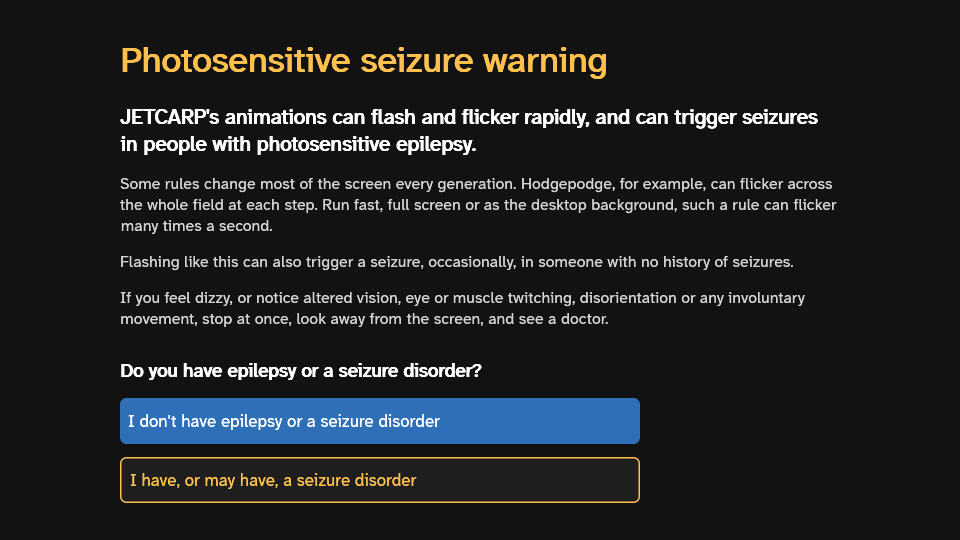
The other answer leads to the advice above. Its main button is Quit JETCARP; a smaller one, Continue at my own risk, goes on:
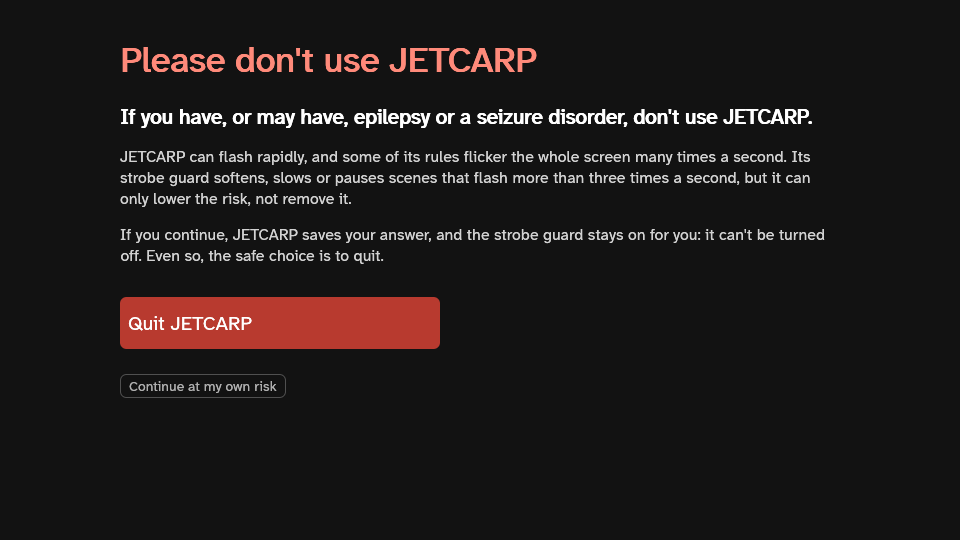
Either answer that goes on is saved, and the warning is not shown again. Quitting saves nothing, so the warning shows at the next launch.
jetcarp setup asks the same in a terminal, before its own questions. Until one of them has been
answered, nothing else starts anything on screen:
| What | Before the warning has been answered |
|---|---|
jetcarp host start, host wallpaper on, host login on, host saver install, and host tune on a running host | Refused, with the warning |
The background host started at login, or by jetcarp host serve | Runs, but holds every screen still; jetcarp host status says why, and the scenes start by themselves once the warning has been answered |
The system’s screen saver (Windows), jetcarp host serve --saver | Refuses to start, with the warning (on Windows in a message box) |
| The app’s screensaver mode and full-screen outputs | Wait for the app’s own warning |
The MCP tool host_control | Refuses wallpaper, login and tune when turning on, with the warning, as the command line does; its other actions reach the host, which holds every screen as above |
What only reads or writes files is not held back: jetcarp host status, jetcarp doctor, pictures,
GIF and WebP animations, videos and scene files. They don’t animate anything on your screen, but
an animation you make can flash like the scene it shows when you play it, so the strobe guard
checks exported animations before they are saved.
A macOS screen saver installed before this warning existed, which macOS gives no way to read JETCARP’s settings, is built again by this version the first time the app, the desktop background or a command runs, with the strobe guard on; and again whenever the answer or the guard’s setting changes (see The system’s screen saver).
Answering from the command line
jetcarp setup in a terminal shows the warning and asks. Where there is no terminal to ask in, or
with --yes, it needs the answer given as --seizure-warning, unless it was answered before:
| Answer | Means |
|---|---|
--seizure-warning no-disorder | You don’t have epilepsy or a seizure disorder |
--seizure-warning at-risk | You have, or may have, a seizure disorder, and go on at your own risk, against the advice above |
With no --profile, only the answer is saved:
jetcarp setup --yes --seizure-warning no-disorder
It prints:
saved your answer to the photosensitive seizure warning: no epilepsy or seizure disorder
Where the answer is kept
The answer is photosensitivity.json in the settings folder, with the
date and the version of JETCARP that saved it:
{
  "version": 1,
  "answer": "no_disorder",
  "date": "2026-11-16T12:00:00Z",
  "jetcarp": "0.4.3",
  "via": "app"
}
answer is no_disorder or at_risk, and via is app or setup. The app, the command line,
the background host and the MCP server all read this file. Deleting it, or the whole settings
folder, brings the warning back.
The strobe guard’s switches are kept beside the answer. Both are on
unless they say otherwise: guard_off when the guard was turned off in the app, and
desktop_guard_off when it was turned off for the desktop background and the screen saver, each
with the date and the version that did it:
"guard_off": { "date": "2026-11-20T15:04:00Z", "jetcarp": "0.4.3" }
For at_risk the guard is on whatever the file says, and stricter: it also veils patterns of
similar parts, regular or not, as EA’s IRIS counts them, so soups, waves and mazes are often shown
dimmed (Stricter for someone at risk).
A new answer starts with both switches on.
Lowering the risk
Fast, large changes of brightness are what can trigger a seizure. Guidance on flashing content, such as WCAG 2.3.1, allows no more than three flashes a second over a large part of the screen. Hodgepodge started from random states swings the whole field between healthy and ill every ten generations or so as it settles: run at 60 generations a second, it flashes about four times a second.
JETCARP’s strobe guard watches every frame it draws, and softens, slows or pauses a scene before it flashes more than three times a second over a large part of the screen, or shows strong regular stripes. It is on for everyone unless turned off in the app. If you answered that you have, or may have, a seizure disorder, it can’t be turned off, and it is stricter: it also dims patterns of similar parts, regular or not, such as a soup of cells or a field of waves (Stricter for someone at risk).
Slower speeds, smaller windows, low-power pacing (jetcarp host pacing low-power) and calmer
rules all flash less. None of this, the guard included, makes JETCARP safe for someone with a
seizure disorder.