The strobe guard
JETCARP’s animations can flash and flicker rapidly, and flashing can trigger seizures in people with photosensitive epilepsy (see the photosensitive seizure warning). The strobe guard watches every frame JETCARP draws, and softens, slows or pauses a scene before it flashes more than three times a second over a large part of the screen, or shows strong regular stripes.
The guard lowers the risk; it does not remove it. It does not make JETCARP safe for someone with a seizure disorder, and it does not certify that anything JETCARP shows or saves meets any guideline. The photosensitive seizure warning still stands.
The guard is on for everyone. Someone who answered the warning I have, or may have, a seizure disorder can’t turn it off. Someone who answered I don’t can turn it off in the app, through a deliberate confirmation (Turning it off).
What it measures
The guard measures what reaches the screen, never what a rule “should” do. A field that flips every generation (a Margolus Tron background, say), run at twice the frame rate, shows the same phase in every frame and does not flash at all; a slow rule with a bright palette can. Each frame is reduced to tiles of 16 by 16 pixels, each with its mean brightness, its mean “redness” and its mean colour, and its fine pattern (below), worked out on the GPU where the frame is drawn there and on the processor otherwise.
The definitions are those of WCAG 2.2’s success criterion 2.3.1, Three Flashes or Below Threshold (W3C 2024; W3C 2025), as the Trace Center’s PEAT (Trace Center n.d.) and EA’s IRIS (Electronic Arts 2023) apply them:
- Brightness is relative luminance: each colour channel decoded from sRGB to linear light, then
0.2126 R + 0.7152 G + 0.0722 B, from 0 (black) to 1 (white). - A transition is a change of brightness of at least 0.1 in one direction, where the darker of its two states is below 0.8. A flash is a pair of opposite transitions.
- A red transition is counted by either of WCAG’s two definitions: if either calls it a red
flash, it is one. WCAG 2.0’s working definition
(W3C 2008), which PEAT and IRIS use, is the same as
a transition, for saturated red (red at least 80% of red, green and blue together): a change of
at least 20 in
(R - G - B) × 320. WCAG 2.2’s (W3C 2024) is a change of more than 0.2 in chromaticity, on the CIE 1976 UCS diagram, to or from a saturated red: red to a green or a grey of the same brightness, say, which 2.0’s measure may barely see. The guard measures it on each tile’s mean colour, counts a run of change once however slowly it goes, and counts one red transition in a frame where both definitions see one. It counts WCAG 2.2’s only on tiles, by the area rule: on a dark ground the whole screen’s mean colour has the chromaticity of whatever is lit, however little of it, so the screen’s mean is tracked by 2.0’s measure alone. - More than three flashes in any one second fail: more than six transitions in a sliding window of one second. Two or three flashes a second is a warning, and a warning that lasts four seconds out of five fails too: IRIS’s extended failure. PEAT warns of long flashing below the limits without failing it, and the broadcasting guidance notes that flashing for more than five seconds might be a risk even within its limits (ITU-R 2023; Ofcom 2017).
The area rule. Flashes are harmful when the flashing areas together cover more than a quarter of any 10° field of vision. How many pixels that is depends on the screen and on how far away you sit, which JETCARP cannot know, so it assumes a close, conservative case: 96 pixels an inch for each step of the screen’s scale factor, watched from 40 cm. On a screen at a scale of 1 the field is 265 pixels across, and a quarter of it is about 13,700 pixels: under 0.7% of a 1080p screen. A closer view, or larger pixels, would make the field smaller; few people watch from closer. The field slides over the screen a tile at a time. Alongside, the mean brightness of the whole screen is tracked the way IRIS tracks a recording’s frame, so anything IRIS would count on a recording of the screen is counted too. A view smaller than the field (the grid in a small window, a preview) counts against the whole field, so a small enough view can flash all over and pass, as the area rule allows.
A flash is an area changing together, so a tile’s transition counts only when at least two of the eight tiles around it made the same transition within the same few frames. A field, a large square or a band flipping counts; a soup of small cells flickering at random changes neighbouring tiles independently, and does not.
Fine patterns. A checkerboard of squares smaller than a tile, reversing in step, keeps every tile’s mean brightness, though every pixel of it changes by as much as its squares differ. WCAG counts it as flashing unless the squares are smaller than 0.1° (under 3 pixels at the distance assumed above), and so does the guard. Besides its mean, each tile keeps its fine pattern: which of its windows of 4 by 4 pixels, one every 2 pixels across and down (49 in a tile), are clearly lighter or darker than the tile as a whole (by at least a tenth of the difference between its light and dark pixels). A window of 4 pixels holds whole periods of a checkerboard of 1- or 2-pixel squares, so such a board leaves every window at the tile’s mean and shows no pattern at all, wherever it lies; squares of 3 pixels and more leave windows lighter and darker, at any offset. When at least nine in ten of the windows clear in this frame and in the tile’s last clear one have changed sides, its pattern has turned into its own negative, and if its light and dark pixels differ by at least 0.1 (the darker below 0.8), every pixel of it has made a transition: the tile makes one, counted with its other transitions, where neighbouring tiles reverse together, by the same area rule. A reversal counts once, whether sudden or a fade. The same is done for “redness”. So a board of squares from 3 pixels up, larger squares half a tile off the tiles’ grid (whose tiles straddle squares evenly), and a stripe pattern that reverses, count as flashing wherever they cover a quarter of a 10° field, long before they cover a quarter of the screen. A soup’s cells change a few at a time, so its tiles’ patterns never turn into their negatives: Life soups from 1 to 16 pixels a cell, still lifes, gliders and blinkers are read as before.
Change in part of a tile. A field of oscillators whose two phases are not each other’s negative (blinkers, toads, clocks, and denser patterns of period 2 that fill the plane) flips part of each tile every generation: a tile’s mean may not move, and its fine pattern does not reverse, but each flipping pixel flashes. WCAG counts such a field where more than a quarter of a 10° field flips: the densest lattice of blinkers flips a quarter of its area, of toads and clocks a third, and the densest such patterns on small tori a half to three quarters; soups of Long Life, Walled Cities, 3-4 Life and DotLife settle with as much. So each tile’s windows are also compared with the frame before. A window that changed sides, the tile’s light and dark parts at least 0.1 apart, made a transition of the pixels under it; so did a tile’s light or dark windows where it went from one brightness to a pattern or back (a cell appearing on a dark tile), and the whole of a tile whose one brightness changed. A window’s change the same way as its last continues one run, as a transition is counted once a run. A tile’s changes count where it oscillates, back where it was two, three or four changes before, and where neighbouring tiles changed too. WCAG counts the area of flashes “occurring concurrently”, so in each frame the area rule counts, alongside the tiles’ own transitions, the part of each tile under the windows that changed in that frame and at least so many times in the last second. That part is what the windows that do not overlap show, but no more than the tile’s light part for windows that came into it, or its dark part for windows that left it; and it is counted 30% larger, since 4-pixel windows miss thin lines (the outlines a light palette darkens beside a lit cell) and parts of cells of 3 pixels, and a field over WCAG’s quarter must never read under it. A soup’s cells change a few at a time and at different moments, so its tiles seldom come back where they were: soups, still lifes, gliders and Life’s ash are read as before.
Restless change. Some rules settle into dense ash that keeps changing in part of each tile without coming back: Walled Cities, 34 Life and Long Life, and soups that stay chaotic, such as Seeds, Replicator and Fredkin, change two fifths to two thirds of their cells every generation. Counted pixel by pixel, WCAG counts such ash as flashing, and concurrently: in each frame the pixels changing, each flashing more than three times in the last second, cover more than a quarter of a 10° field. IRIS, which takes the mean of the whole frame, does not, since its mean hardly moves. So a tile’s windows’ changes also count apart, oscillating or not, where its mean moved much less than they did and neighbouring tiles changed too, each window’s over the whole last second; and the area rule counts them alone, as it counts change in part of a tile. Busy scenes whose change is spread out in time are not flashing by this count, nor by WCAG counted pixel by pixel together: a Life soup’s or Brian’s Brain’s pixels change often, but those changing in any one frame cover well under a quarter of a field.
Stripes. Regular high-contrast stripes can trigger seizures as flashes can (ITU-R BT.1702, ITU-R 2023; Ofcom’s guidance on flashing images and regular patterns, Ofcom 2017). The guard looks for them four times a second, in a half-resolution copy of the frame, in windows of 16 by 16 samples at four scales, so stripes from 4 to about 128 pixels a pair are seen. A window has stripes when its light and dark parts differ by at least 0.05 in brightness (the dark ones below 0.8); when its rows or its columns cross from light to dark regularly, the same number of times in each line and a period apart; and when it matches itself shifted by a period and is its own negative shifted by half of one. Stripes at any angle, checkerboards and rows of dots all count; noise, random cells, and cell outlines over dead cells do not. Over a large, even, bright field (a quarter of the view or more, of cells within 0.1 of each other’s brightness), the outlines of a regular grid (squares, and hexagons from about 12 pixels a cell) would be strong stripes, rows of repeated squares, so JETCARP draws them there no more than 0.06 darker than the cells: under the stripe check’s limit, and still visible. Elsewhere, beside darker cells, over small bright shapes, and on tilings whose outlines make no stripes, outlines look as they always have. Stripes covering more than a quarter of the screen, with more than five light-dark pairs across them, are a harmful pattern (the guidance’s limit for stripes that oscillate, flash or reverse); harmful for half a second, they fail, as IRIS counts them. For still stripes the guidance allows up to 40% of the screen (Ofcom’s rule, which BT.1702 gives as informative guidance); JETCARP, like IRIS, uses a quarter for still and moving stripes alike. Stripes finer than 4 pixels a pair blur into the half-resolution copy and are not measured; at the assumed distance they are more than six cycles a degree.
What it does
It acts in order, as far as it has to:
- Soften. As soon as a quarter of a 10° field has made two transitions in a second (or the screen’s mean has), the tiles that are changing, and those around them, are softened: each tile’s brightness may change by at most 0.3 a second, so a flip becomes a fade, and what is shown makes at most three transitions a second whatever is drawn. A tile stays softened for a second and a half after it last changed. Tiles elsewhere are shown as drawn.
- Slow. A scene still flashing after a second of softening is slowed, so that it can be seen again rather than as a wash: its speed is capped at what brings it to one flash a second, and lowered again every second and a half while it still flashes, down to half a generation a second. Slowed, it no longer flashes on its own, and the softening lets go.
- Pause. When neither is enough (the scene still flashes at half a generation a second, so its flashing does not come from its generations), or more than three flashes a second reached the screen, the scene is paused, with a note saying why.
Stepping counts too. A scene stepped by hand (S or → held down, the Step button, or AI control) is measured at the rate its steps come, as a run is. The cap holds its steps as it holds a run: a step sooner than the cap allows is dropped, with a note in the status line, so a key held down builds no backlog. While the guard holds a pause, steps come no faster than one every two seconds, its slowest pace.
Strong stripes are veiled where they are found: blended towards a dim grey (no brighter than 0.18) until their contrast is 0.04, below what counts. The veil comes on over an eighth of a second, well within the half second stripes are allowed, and stays for a second and a half after they go, so it never flashes itself.
A fine pattern that reverses keeps its tiles’ mean brightness, so softening, which limits how fast that mean may change, cannot calm it. Where fine patterns flash on their own over a quarter of a 10° field, the tiles that reverse and those around them are veiled too, at once rather than over an eighth of a second (coming on, the veil changes each pixel once, as the next reversal would have), and the veil goes as it does for stripes. The scene is slowed as any flashing scene is, and once it no longer flashes, the veil lets go. A few tiles reversing now and then, as Hodgepodge’s waves do when the whole field swings, are left to the softening and the slowing.
Change in part of a tile is calmed the same way. Where a tile’s changing part moves its mean by much less than its pixels (under three quarters as much), softening its mean cannot hold its pixels to three transitions a second, so where such change flashes over a quarter of a 10° field, those tiles and the tiles around them are veiled at once; where the whole of a tile changes with its neighbours in turn (large cells, one tile up as the next goes down), it is softened. Either way the scene is slowed, and the veil lets go once it no longer flashes. Restless change is veiled the same way, at once, where it flashes on its own twice a second over a quarter of a 10° field, well before the seven transitions that fail: before, it was only softened, which holds a tile’s mean and not its pixels, and up to 2.7 seconds of flashing reached the screen before the scene was slowed. A Life soup and Brian’s Brain at 30 generations a second count 3 at most this way, so they are left to the softening.
The guard changes only what is shown and how fast generations are shown. A world computes the same generations whatever the guard does, and a scene’s hash is the same.
Stricter for someone at risk
For someone who answered the warning I have, or may have, a seizure disorder, whose guard can never be turned off, the guard is stricter about patterns. Besides regular stripes, it veils any pattern of similar parts, regular or not, as EA’s IRIS counts one: at least six parts alike in shape (a soup of square cells, scattered dark cells on a light ground, a field of waves), the rectangle around them a quarter of the screen or more, their light parts at least 0.25 in brightness, for half a second. JETCARP also asks that the light parts be at least 0.1 brighter than the dark ones, the change a flash needs; IRIS does not. The guard veils such patterns where they are, as it veils stripes, and far enough that their light parts drop below 0.25. Flashes are measured as for everyone.
So for them ordinary soups, waves and mazes are often shown dimmed, where for anyone else they are shown as drawn. It applies wherever their answer does: the app’s view, full screen and the outputs, the desktop background and the screen savers (whose own switch, always on for them, uses the stricter rule while the saved answer is at risk; macOS’s screen saver bakes it in when installed), and the animations they export. Checked against IRIS, the stricter guard leaves IRIS nothing to fail, for flashes or for patterns, on any recording of the test corpus (Comparing with IRIS). It still does not make JETCARP safe for someone with a seizure disorder.
How it is measured: the half-resolution copy of the frame (halved again until it is at most 480
samples wide) is cut into light and dark at Otsu’s threshold
(Otsu 1979), as IRIS cuts it; each connected light
or dark part from 0.155% to a sixth of the copy is taken as its convex hull, and two parts are alike
when their Hu moments (Hu 1962) differ by less than 0.7
by OpenCV’s matchShapes, method I1
(OpenCV n.d.), IRIS’s measure and threshold.
The most parts alike to one of them, and the rectangle around them, are the pattern. A check costs
a millisecond or two, four times a second, and only for someone at risk.
Where it works
| Where | Which switch |
|---|---|
| The app’s view, full screen, and each output window | The app’s |
| The world an AI acts on through AI control (the app’s view) | The app’s |
| The app’s screensaver mode | The desktop’s |
| The desktop background on Linux (the GNOME extension included), Windows and macOS | The desktop’s |
The screen savers: Windows’ .scr, and macOS’s JETCARP.saver | The desktop’s |
| The Quick Start’s live cards, and the animations the Hunts window and the ants window play | The app’s |
Exported animations: File → Export animation…, jetcarp media render, an explore search’s atlas clips | The app’s |
Animations the MCP tool media_render saves | Always on |
The desktop background and the screen saver are drawn by the background host, which reads the switch again every couple of seconds. A Quick Start card is one among many on the screen, so its own picture is its field: a quarter of a card flashing counts, since a screenful of such cards could flash together. The sandpile preview changes at most four times a second, and the HashLife view only when a jump is asked for, so neither can flash more than twice a second.
macOS runs its screen saver in a sandbox that cannot read JETCARP’s settings, so jetcarp host saver install bakes the switch, and whether the answer to the seizure warning is at risk, into
the bundle; whenever either changes, JETCARP builds the bundle again with them (see
The system’s screen saver).
Turning it off
The guard can be turned off only in the app, in Settings → Safety, and only by someone who answered the warning I don’t have epilepsy or a seizure disorder. For someone who answered I have, or may have, a seizure disorder, the window says the guard is always on, and offers no switch.
The app and the desktop background have a switch each. Turn off the strobe guard… (and, for the desktop background and the screen saver, Turn off the strobe guard for the desktop…) opens a confirmation:
Turn off the strobe guard?
The guard slows or softens scenes that flash more than three times a second, or show strong flickering stripes. Without it, some scenes will flash rapidly at full speed.
☐ I don’t have epilepsy or a seizure disorder, and I understand that rapid flashing can occasionally trigger a first seizure in someone with no history of seizures.
Keep the guard on · Turn it off
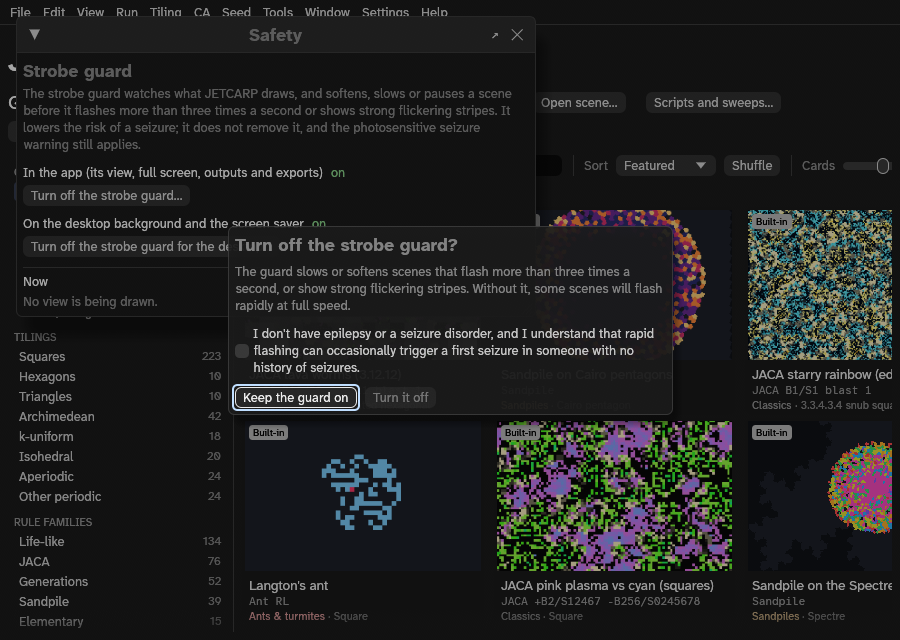
The box starts unticked, Turn it off works only with it ticked, and Keep the guard on is the default (Escape keeps it on too). The desktop background’s confirmation adds a sentence: The desktop background and the screen saver can be seen by anyone in the room, who has not answered this warning. One of them may have epilepsy, or not know that they do. That is why its switch is separate: turning the guard off in the app leaves it on for the desktop background and the screen saver.
The choice is saved with the warning’s answer, with its date and version (Where the answer is kept). Turn the strobe guard back on undoes it at any time. Answering the warning again starts with both switches on.
Nothing else turns the guard off: not the command line, not a script, not the MCP tools, and so not an AI. They can read the switches, and turn them back on:
jetcarp guard            # the switches, and the answer
jetcarp guard --on       # both back on (or --on app, --on desktop)
What it tells you
While the guard acts, the app’s status bar says so (Strobe guard: softening flashes over 40% of
the view., Strobe guard: slowed to 2 generations a second, because the scene flashed 4 or more
times a second.), its note first, ahead of any other (such as why a scene opened paused, which
then follows it, cut short with “…” if the line is full). With the status bar off, its note shows
over the grid’s top left for a few seconds, any other note below it. Clicking it opens Settings →
Safety, which shows what the guard is doing now,
the readings behind it, and what it did lately. With the guard off, the status bar says when a scene
flashes. The background host logs what the guard does (jetcarp host status), and each screen’s
stage.strobe_guard says what it is doing there; the MCP tool app_display and jetcarp host status report the switch as strobe_guard.
Exported animations
An animation posted online flashes for whoever opens it. Exported GIF and WebP animations are measured frame by frame, at their own frame rate, looping as a player would (at least twice and for at least six seconds, so the seam where the end meets the start is measured too), as WCAG asks of clips that may loop (W3C 2025). Each is measured as shown at its own size on the screen the guard assumes (above): the 10° field is 265 of its pixels across, a little smaller than WCAG’s own estimate for a 1024 × 768 screen, a rectangle of 341 by 256 (W3C 2024). The whole frame’s mean is tracked as IRIS tracks a recording, so a small animation that flashes all over is caught too. An animation that flashes more than three times a second, or two or three times a second for four seconds out of five, or shows strong stripes for half a second, is caught before it is saved.
- In the app (File → Export animation…), such an animation is held before it is saved, with what was found and a choice: Save the softened version (the default), or Cancel. With the app’s guard turned off, Save it as it is is offered too.
- The command line (
jetcarp media render) saves the softened version, and says so on a line of its own; it saves the animation as it is only when the app’s guard is off, and says that too. The MCP toolmedia_render, and a script run through it, always save the softened version. The media’s metadata records what was found and what was saved (strobe_guardin each file’srenderrecord). - The atlas clips of an explore search are checked the same way, following the app’s switch.
The softened version is, when showing each frame up to four times longer brings the animation to one flash a second and it has no strong stripes, the animation slowed: every frame stays as drawn, so an oscillator’s few phases do not blur into one. Otherwise it is the guard’s softening carried out on the frames: every tile that flashes anywhere in the loop is softened throughout, fine patterns that reverse, change in part of a tile and restless change are veiled where they flash, and stripes are veiled where they were found; the softener goes round the loop twice and keeps the second time, so the end flows into the start. What is saved is what is checked: a GIF has at most 256 colours, and squeezing a fade into them could turn it back into a flip, so the saved file is read back and checked again. If it still fails, each frame is shown longer as well, until it passes.
Since 0.4.3 the strobe guard is part of every animation’s render key, so jetcarp media render --missing renders again, through the guard, every animation made before it.
What it costs
Measuring is one read of each frame on the GPU, in a compute pass, fine patterns and colours included. On an AMD Radeon 8060S it takes 0.07 ms a frame at 1920 × 1080 (0.4% of a 60 Hz frame) and 0.29 ms at 3840 × 2160 (1.7%); with neither it took 0.03 and 0.11 ms. On a weak integrated GPU, perhaps a tenth as fast, it should stay under 5% of a frame at 1080p (not yet measured). Its readings come back to the processor, 80 bytes a tile (2.6 MB a frame at 3840 × 2160), in about 0.15 ms. Counting the transitions in them takes the processor (a Ryzen AI Max+ 395) about 1 ms a frame at 3840 × 2160 (0.7 ms with neither), for the frames as drawn and again as shown; 2 to 3.5 ms while the whole screen flashes every few frames, and up to 11 ms in the frames the whole screen changes in part of every tile, every frame, until the scene is slowed. Comparing each tile’s windows with the frame before (Change in part of a tile) doubled these, from 0.5, 0.35 and 1.5 ms; keeping a second of each tile’s windows’ changes, for restless change, added about a tenth, and a quarter to the frames that change everywhere every frame, and takes about 28 MB more a meter at 3840 × 2160. Softening costs more, 0.15 ms a frame at 1080p on the same GPU, but only while it acts. The stripe check takes about 3 ms of one processor core for a 1080p frame, four times a second. On a surface the guard cannot read in place, each frame is drawn into a texture and copied to the screen.
What it cannot do
- It sees only what JETCARP draws: not other programs, and not what your screen does with the picture (its brightness, its contrast, any motion smoothing).
- It assumes a viewing distance and a pixel size. Watching from closer than 40 cm, or on a screen with larger pixels than 96 an inch at its scale factor, makes a 10° field fewer pixels than it assumes. On a screen with a scale factor above 1, a fine pattern of 3-pixel squares counts, though there they are under 0.1°: stricter than WCAG.
- It sees each tile through 49 windows of 4 by 4 pixels, which see cells of 3 pixels only in part. So restless change in cells of 3 pixels counts more slowly than it happens, and where it is veiled, the veil’s coming on can be one transition too many: chaotic soups of Seeds, Replicator and Fredkin at 3 pixels a cell in a dark palette can show a frame or two over the limit, counted pixel by pixel, before they are veiled. Restless change sparse enough that WCAG, pixel by pixel, does not count it as flashing together (DotLife’s ash at 3 and 4 pixels a cell, Lava’s at 3) is left to the softening, which holds a tile’s mean and not each of its pixels, so it may show up to a second of flicker that counts as flashing when each pixel’s changes are counted over a second, whenever they came (see below). Since the windows’ part of a tile is counted 30% larger than they show, a sparser field of small cells flipping in part can read as flashing where WCAG would pass it (a blinker every 4 cells at 7 to 10 pixels a cell, or every 5 cells at 3 to 6, a fifth or a sixth of it flipping): stricter than WCAG. Cells of 1 and 2 pixels, under 0.1°, are mostly not seen in part, as WCAG’s exception for a fine, balanced pattern allows.
- It counts the area of flashes occurring together, as WCAG words it. Counting each pixel’s own transitions over a second, whenever they came, counts more of a soup’s flicker: by that measure a Life soup at 30 generations a second flashes more than three times a second at every cell size from 1 to 16 pixels, though the pixels flipping together in any frame cover far less than a quarter of a 10° field more than once a second. The guard counts such a soup from about 8 pixels a cell, where its tiles’ means change together.
- It measures WCAG 2.2’s red flashes on each tile’s mean colour. On a dark ground a tile’s colour is that of its few lit pixels, so a small red flicker counts for its whole tile: stricter than WCAG. A fine pattern of reds and greens of one brightness reversing is counted by WCAG 2.0’s measure only.
- It acts on a frame or two of readings: a scene that starts flashing shows a few transitions before the softening starts. It starts at two, so even then what reaches the screen stays at three flashes a second or fewer.
- It cannot tell whether a pattern is provocative for you in particular. Patterns and flashes can be uncomfortable well below the thresholds.
How the guard is checked, without anyone watching flashing scenes, is described in How JETCARP is tested.